
As is tradition, last month the update was released so you can play our beloved Championship Manager 01/02 with the most up-to-date transfers and squads — and at last we have the latest version available.
The October 2026 update is now on our Google Drive!
Editor’s Note: As I’m currently focused on the technical maintenance of the site, I haven’t yet exhaustively tested this version. If you find any “bugs” or players with strange attributes, please leave your report in the comments to help the community!
Download: CM 01/02 October 2026 Update
To download the most recent database produced by the friends of the Champman forum (a hug to Dermotron), use the link below:
Prerequisites
For this update to work correctly, you need to have the game installed with the official v3.9.68 patch.
If you don’t yet have the game or the patch, check out our CM 01/02 installation guide for 2026.
Step by Step: How to Update Your Game
The update process involves replacing the files in the Data folder. Follow these steps to avoid errors:
- Backup for Safety: Before you begin, make a copy of your
C:\Program Files\Championship Manager 01-02\Datafolder and save it somewhere else. If something goes wrong, you can restore the original database. - Extraction: Open the downloaded .zip file with your favorite program (WinRAR or 7-Zip) and extract all the files to a temporary folder.
- Replacement: Copy all the extracted files and paste them into the game’s Data folder (usually at
C:\Program Files\Championship Manager 01-02\Data). - Confirm: When Windows asks whether you want to replace the existing files, select “Yes to all.”
Important Compatibility Tip
On Windows 10 and 11, it is essential to configure the executables (cm0102.exe and cm0102ed.exe).
Right-click on them, go to Properties > Compatibility and check “Run this program in compatibility mode for: Windows XP (Service Pack 3)” and “Run as Administrator.”
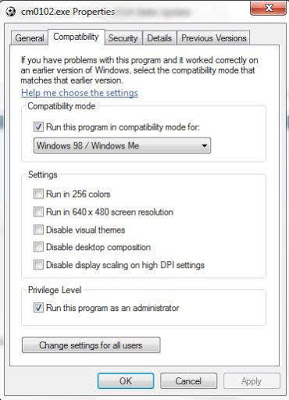
Image source: Champman
